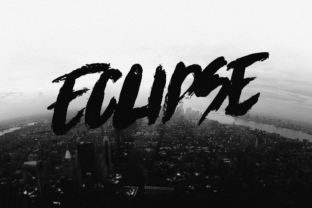
Eclipse: A Bold Display Font with Raw, Expressive Impact
Eclipse isn’t built for body text or subtle refinement—it’s engineered for presence. As a display font, Eclipse delivers high-contrast letterforms, deliberate irregularities, and a tactile sense of energy that reads as both intentional and unfiltered. Its design language leans into controlled imperfection: uneven stroke weights, slightly asymmetrical terminals, and a grounded, almost architectural stance. Unlike many contemporary display fonts that chase trend-driven polish, Eclipse embraces a raw vibe—not as a gimmick, but as a functional aesthetic choice rooted in visual rhythm and expressive clarity.
What Sets Eclipse Apart Visually and Functionally
Eclipse distinguishes itself through consistency in its deviation from convention. Its uppercase letters feature strong vertical stress and tightly spaced side bearings, giving headlines an immediate sense of density and authority. Lowercase characters maintain legibility despite angular joins and purposefully truncated curves—especially noticeable in letters like a, e, and s. The font includes a full Latin character set (A–Z, a–z, numerals, standard punctuation), with well-drawn diacritics supporting common Western European languages. Kerning pairs are thoughtfully adjusted, particularly for frequent combinations like “To”, “Av”, and “Le”, helping prevent visual collisions without sacrificing its assertive tone.
It’s not a variable font, nor does it offer optical sizing variants—but that’s by design. Eclipse performs best at larger sizes (36pt and up for print; 48px and up on screen), where its structural details resolve clearly. At smaller sizes, contrast and tight spacing begin to compromise readability, making it unsuitable for captions, UI labels, or long-form interface text. This limitation isn’t a flaw; it clarifies Eclipse’s role: a tool for emphasis, identity, and momentary impact—not ambient communication.
Real-World Performance Across Media and Contexts
In branding applications, Eclipse excels when paired with neutral, highly legible sans-serifs (like Inter, Poppins, or even Helvetica Neue) for supporting text. A small business owner launching a craft brewery might use Eclipse for the logo and taproom signage, then switch to a clean, open sans for menu descriptions and event details. The contrast reinforces hierarchy while letting Eclipse’s personality anchor the brand’s voice—confident, grounded, and unapologetically physical.
For digital use, Eclipse holds up well in hero sections, email headers, and social media cover images—provided the background offers sufficient contrast and the rendering environment supports modern OpenType features. It renders cleanly in Safari, Chrome, and Firefox on desktop and iOS. Android WebView support is solid above version 7.0, though some older Samsung devices may show minor hinting inconsistencies at very large sizes. Embedding via Google Fonts isn’t available; users typically self-host the WOFF2 files, which keeps file size lean (~48 KB for the regular weight).
Print remains Eclipse’s strongest domain. Its ink-trap–inspired counters and robust stem weights translate reliably across offset, digital, and even screen-printed applications. Designers working on limited-edition posters, vinyl record sleeves, or exhibition banners report consistently strong results—particularly when printed on textured stocks, where Eclipse’s rawness harmonizes with paper grain rather than fighting it.
Who Benefits Most—and When It’s Not the Right Choice
Eclipse serves professionals who prioritize distinctiveness without sacrificing craft. Freelance designers building brand identities for independent fashion labels, music collectives, or indie publishing houses often cite Eclipse as a go-to for logotype development and campaign headlines. Educators creating workshop materials for typography or visual storytelling courses use it to demonstrate how contrast, weight distribution, and negative space shape perception. Marketers running time-bound campaigns—product launches, gallery openings, festival lineups—appreciate its ability to stop scrolling and convey urgency or attitude in under two seconds.
That said, Eclipse isn’t universally adaptable. It doesn’t scale gracefully into accessibility-first environments where WCAG contrast ratios must exceed 4.5:1 at small sizes—its intended use case simply doesn’t include those constraints. Similarly, teams managing multilingual global brands may find its limited language support (no Cyrillic, Greek, or extended Vietnamese glyphs) a hard constraint. And if your workflow relies heavily on real-time collaborative tools with limited font syncing—like certain CMS-based editors or legacy presentation software—self-hosting and licensing verification add minor overhead.
Practical Integration Tips and Workflow Considerations
Start by testing Eclipse in context—not in isolation. Drop it into a mockup alongside your actual body typeface, color palette, and imagery. Does it elevate the message—or compete with it? If your audience skews toward formal sectors (legal services, financial reporting, academic journals), Eclipse’s boldness may misalign with expected tone, regardless of execution quality.
When pairing, avoid other high-contrast or geometric display fonts. Instead, lean into typographic contrast: Eclipse + a warm, humanist sans (e.g., Work Sans or Manrope) creates balance. For editorial layouts, consider using Eclipse only for section headers and major pull quotes—not subheads or deck copy.
Licensing is straightforward: Eclipse is available under a commercial license with perpetual use rights, including web, app, and print. There’s no subscription model or usage cap—just a one-time fee per license tier (desktop, web, or extended). That predictability benefits small studios and solopreneurs budgeting for long-term asset ownership.
Long-Term Value and Design Longevity
Eclipse avoids trend dependency by anchoring its aesthetic in structural honesty rather than novelty. Its forms don’t rely on fleeting stylistic cues like exaggerated serifs, distorted proportions, or AI-generated randomness. That gives it staying power: a logo set in Eclipse today remains legible and conceptually coherent five years from now, provided the broader brand strategy stays consistent.
That durability comes with responsibility. Because Eclipse makes such a strong statement, it demands thoughtful application—not just decorative placement. Its value increases with intentionality: when used to reinforce meaning (e.g., “Eclipse” as a title for a project about visibility and shadow), or to signal a deliberate break from convention (a tech startup emphasizing analog texture in a digital space), its raw vibe becomes strategic—not just stylistic.
Ultimately, Eclipse earns its place not by being versatile, but by being exceptionally good at one thing: commanding attention with integrity. It won’t solve every typographic challenge, and it shouldn’t. But for creators who need a display font that communicates strength, authenticity, and focused energy—without shouting or overcomplicating—the investment in Eclipse pays off in clarity, cohesion, and quiet confidence.